

Artist Website Crash Course
Description
Create an Online Gallery
- Hosted vs. Self-hosted Platforms for Online Galleries
In this video, you will learn what CMS is, and the difference between a hosting and self-hosting platform. A PDF will be available for download.
- Third Party Websites
In this video, you will learn what a Third Party Website is, Pros and Cons, most common Third Party Websites and who should be selling on a Third Party Websites. A PDF will be available for download.
- Make Your Online Presence
This video I go over the importance of spending your energy on what will give you the best results. Your main focus is to build an audience and an online presence. A PDF will be available for download.
- Art Business Start-up Blueprint
In this video, you will two Art Business Blueprints that will help you to build a solid business. You will learn what it takes to build a solid foundation that will help you to grow your art business year after year. A PDF will be available for download.
- Start an Etsy Store
This is a step by step guide that will help you to start your Etsy store in no time. You have art to sell. Starting with an Etsy store will help you to attract people that are interested in the art that you create while giving them an opportunity to purchase your art. A PDF will be available for download.
- Build Your Brand
In this video, you will learn about the importance of building a brand for your art business and how to develop a brand that will grow your business. A PDF will be available for download.
- Responsive Website
In this video, you will learn what a responsive website is and its importance. You will also learn about premium themes and the most common sites to purchase a premium theme. A PDF will be available for download.
In this video, you will learn what a Responsive Website. You will also learn about premium themes. A PDF will be available for download.
This course will give all the information you will need to open an online art gallery so you can start selling you artwork online.
If you are interested in selling art online you will need to have a place where people can go to see your work and purchase your work. In this course, I will go over different options that are available for you to make the best decision for your goals.
How to Open an Etsy Store Tutorial
Starting an Etsy Store can be intimidating and confusing, I wanted to make it an easy proses for you so you can start selling your artwork. There are 6 videos that will go over everything from start to finish. I will walk you through step by step. There is also a PDF that you can download and print with some extra valuable information.
Video 1 Intro with PDF
Video 2 Shop Preference Page
Video 3 Name Your Shop
Video 4 Add Items to Your Store
Video 5 Select a Payment Method
Video 6 Set up Billing
Open Your Store
Content Marketing crucial for all businesses to be noticed on the over populated web.
This course is for the artist who wants to grow a strong online art business and who are new to content marketing. If you are ready to take your business to the next level and want to be found on the internet, this course is for you. Learn how content marketing will help you to attract your target audience and learn basic and easy to implement content writing strategies that will make your audience wanting more.
Course:
Introduction
Module 1 Content Marketing Basics
- 21 page downloadable PDF Content Marketing Basics
- About Content Marketing – video
- Business and Storytelling – video
- Content Marketing – video
- Art Blog Checkoff List – video
Module 2 Content Marketing Fundamentals
- Setting Goals – PDF
- Artist Blog Vission Statment – PDF
- Schedule Time to Write – video
- Blog Post Structure – video
- Unique Writer’s Voice – video
- Blogging Platforms – video
Module 3
28 Day Blogging Challenge
- Day 1 Vision and Goals – video
- Day 2 Create a List Post – video
- Day 3 Research Your Niche – video
- Day 4 Promote Your Blog Post – video
- Day 5 Comment on Blog Posts – video
- Day 6 Showcase Your Art on a Blog Post – video
- Day 7 How to Write an Outbound Link Post video
- Day 8 Choose One Social Media Platform – video
- Day 9 How to Create a Social Media Calendar
- Day 10 How to Write a Review Post Part 1 – video
- Day 11 How to Write a Review Post Part 2 – video
- Day 12 How to Brainstorm Post Ideas for Art Blogs – video
- Day 13 How to Create a Blog Editorial Calendar – video
- Day 14 How to Monitor Your Niche – video
- Day 15 Revise Your Top Blog Pages – video
- Day 16 Write an Instructional Post – video
- Day 17 Create Headlines That Attract Readers – video
Module 4
Content Marketing Strategies
- What Are Website Backlinks and How to Build Them – video
- Content Marketing Basics – video
Course Curriculum
- Content Marketing Basics Introduction
- Content Marketing Basics PDF
- About Content Marketing
- Business and Storytelling
- Art Blog Checkoff List
- Setting Goals PDF
- Artist Blog Vision Statement PDF
- Schedule Time to Write
- Blog Post Structure
- Unique Writers Voice
- Blogging Platforms
- Day 1 Before You Start a Blog Vission and Goals
- Day 2 Create a List Post
- Day 3 Research Your Niche
- Day 4 Promote Your Blog Post
- Day 5 Comment On Blogs
- Day 6 How to Showcase Art with Blog Posts
- Day 7 How to Write an Outbound Link Post
- Day 8 Choose One Social Media Platform
- Day 9 How to Create a Social Media Calendar
- Day 10 How to Write a Review Post Part 1
- Day 11 How to Write a Review Post Part 2
- Day 12 How to Brainstorm Post Ideas for Art Blogs
- Day 13 How to Create a Blog Editorial Calendar
- Day 14 How to Monitor Your Niche
- Day 15 Revise Your Top Blog Pages
- Day 16 Write an Instructional Post
- Day 17 Create Headlines That Attract Readers
- Content Marketing Basics
- What Are Website Backlinks and How to Build Them
HOW TO BUILD YOUR OWN SELF-HOSTED ARTIST WEBSITE (EVEN IF YOU HAVE ZERO TECH SKILLS!)
[FREE 6-VIDEO COURSE]
Build An Audience and Sell More Creative Work With This Complete Artist Website Building Course (A $97 Value, FREE)
What You’ll Find Inside This Course
- What you’ll find below is a 100% free and no strings attached video course (with 6 videos) … that contains a complete guide to building your artist website online with WordPress.
- You’ll get simple, step-by-step instructions on how to create a virtual art gallery and portfolio that works 24/7 to build an audience who will love, share, and buy your work. This format works for art, sculpture, photography, illustration, design, handmade work, anything creative that you want to sell online.
- You’ll get behind-the-scenes access to a winning strategy for furthering your creative business, without any complicated technical fluff. You don’t need to be a technical guru to do this… I promise!
There Really Are No Strings Attached (Seriously!)
You can watch this entire 6-part video course below without even opting in. You can scroll down right now and watch all 6 videos.
You should know this is the complete course. There is no part 2 of this course that I’m trying to sell you, or any other information product you need to buy to start building your site.
You can also start implementing all these website strategies in your business starting today. (I hope you do!)
Why I Created This 6-Part Course
I love how having self-hosted websites have liberated my own creative businesses and helped me gain independence from third party platforms… letting me create whatever I want on them! I want you to benefit from the same strategies I’ve been using.
My goal was to create something that most people in the creative or business world would charge between $47 and $97 for. And then give it away for free.
You see, I created Artist Myth to help creatives overcome the myths that hold them back from having fulfilling, sustainable creative businesses. Some of those myths are that we think we have to rely on tech wizards or restrictive platforms to have an effective website… or that we have to spend hundreds of dollars on expensive solutions… or that we have to give up control of how our site looks and works, making unreasonable sacrifices due to other people’s rules.
I’ve also heard too many horror stories of artists investing lots of time and dollars on someone else’s “free” website or social media platform… only to be barred, unlisted, or banned, all but destroying their business overnight. I don’t want that to happen to you!
Here’s a glimpse at what you can expect:
I’m Giving You A Behind the Scenes Glimpse At How I’ve Built Creative Websites For Over Five Years (and Explaining How to Do It)
In this free course, I’m showing you the exact system I have used to build my website here at Artist Myth. (And continue to use to this day for my other websites.)
I promise you — this is a complete system that absolutely anyone can start implementing immediately. It’s a process that works because as you’ll see, its aim is to make you independent of restrictions and the empty promises of having to rely on Social Media and “done for you” freebie platforms, and it includes the missing pieces they “conveniently” leave out of what they tell you.
If you implement this process exactly as I’m showing you, there’s a good chance you will (at the very least) increase the size of your email list and get more qualified leads for your art . You’ll also have an evergreen online art gallery in place to grow your business while you sleep – without fear of it being yanked out from under you.
Of course, I’m not just going to tell you the steps… I’m also going to tell you why you’re taking them. They’re based on best practices that I’ve learned from building my own creative business (and from coaching others how to build their own artistic endeavors). Since I’ve already figured all this out for you, it will remove a lot of the headaches and hassles that most people experience trying to figure this out on their own. (And I’ll give you as much perspective and examples as I can fit into each video).
So, without further ado, here’s the course…
LESSON #1
Why Do Artists Need A Self-Hosted Website?
In this first video, I’ll give you the reasons why creatives need our very own piece of online real estate. You’ll also learn the pitfalls of relying only on “freebie” websites and social media. Press play to watch this video now…
|
This section aims to introduce you to some of the basics of websites for artists. It will cover:
Note not all the links are live as yet – but will be in the near future. |
Artists are building their own good-looking and fully functioning websites using the webware available online. In summary you can create a good looking website – if you can
|
CHECKLIST: Deciding on a website host
|
Key considerations when deciding on a website hostinclude:
Try this CHECKLIST – 30 questions: a Website Checklist for Artists. It’s not about hosts and website builders. Instead it focuses on:
|
- how you communicate about yourself as an artist and your art
- whether you share the content of your website efficiently and effectively
- whether you control the content of your website
FEATURES – do you know what basic features you need?eg
- What sort of storage and bandwidth do you need?
- What are your basic requirements and what would be nice to have?
- Do you prefer to combine hosting and webware – limiting your main concerns to content and marketing (with others looking after technical updates and security issues)?
- Do you intend to sell art from your website? Will you need an e-commerce option with good quality security? Does your site need to be indexed in search engines?
- Do you know which features are unlimited and what is restricted?
PERFORMANCE – Does performance need to be very reliable?
- Does it need to be very fast?
- How good is your host at maintaining uptime?
- Are you prepared to pay the extra for very reliable performance?
SUPPORT – How much support will you need to run your website?
- What do other consumers have to say about the accessibility and quality of available support?
|
Websites enable you and your art to be found online. But why have one? |
This page looks at:
|
Why have a website?
|
They are ubiquitous
They help get your name known
|
They help market your artwork
Your website provides information about your credibility and authenticity. |
- Galleries now screen artwork online rather than via portfolios
- Collectors often screen an artist’s work online before making an investment ( “who is this artist?” / “what else have they produced? / where have they exhibited? )
- Include current information about galleries and/or exhibitions – and people know where to go to see your art ‘face to face’.
BUT you still MUST be active in marketing yourself and your art.
“Build it and they will come” concepts of websites were debunked a long time ago. Just creating a website will NOT generate traffic!
They help sell your art
- You can sell your art direct from your website
- You can link direct from a painting on your website to the gallery which is selling it
- You can link direct to the third party site where you are selling art
Why design and functionality matter
See Web design for artists
|
Websites can impress if they work well.
Speed is increasingly important as a factor determining how websites rank in Google.
|
Browsing is increasingly done via mobile devices.
A website is not fully functional if it cannot be viewed on a tablet or a smartphone. The emphasis is now on websites which can be viewed on any device of any size.Image size and quality is very important for artists
Flash does NOT help to impress.
|
Your Art Business Name Matters!
|
You need to decide pretty early on what you’re going to be known as online – and what your ‘trading name’ is going to be Check out what happens when you search the internet for your name. Have you got competition?
examples of domain names for artists
|
REFERENCE:
|
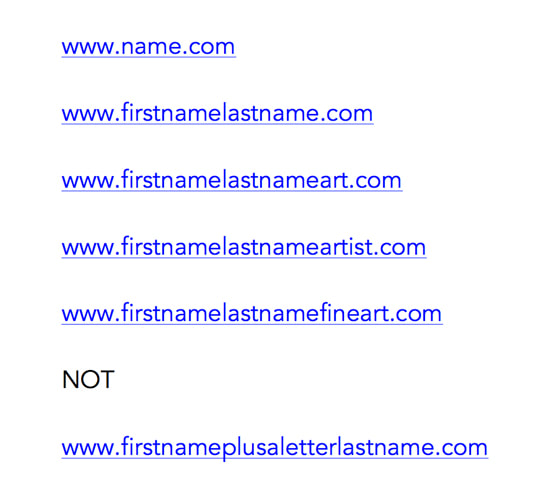
How to have an impact on the Internet!
|
If you’ve been selected for an open exhibition / art competition… Make sure you use the opportunity for some free publicityto raise your profile via your website. DO make sure that:
|
All about you! Make sure your website includes the basics. These are
|
Factors to consider when developing a website
Limited or Flexible?
There are a number of options for hosting a website. Different options offer different packages.
Below I’ve listed a check list of factors to be considered when deciding how to host a website
Technical – Independence
|
INDEPENDENCE
|
- Do you want to be dependent? (i.e. somebody else knows how to make the changes and you can’t make changes)
- OR independent? (i.e. easy to update and you can make the changes)
RECOMMENDATION: I’m 100% in favour of being 100% independent. I have heard far too many horror stories from artists whose websites languished while they tried to get an individual to change them.
Hosted on your own server OR on a shared server?
- The impact of this decision in part depends on how good a service is offered by a shared server solution. It is generally a good idea to look at what sort of set-up a host has for it their host servers go down. Do they have robust back-up arrangements?
- If you’re very successful you might run out of bandwidth – and that’s when you see a website which is inaccessible.
RECOMMENDATION: Whatever your method of hosting make sure you have enough bandwidth and your website can always be accessed easily
Coded by you OR by somebody you employ?
- One thing is certain code is not easy and changes all the time. You can spend a lot of time trying to learn code without becoming good at it – and any knowledge you acquire will need to be updated over time.
- Another thing is very clear – people who are happy to take your money to code your at the outset may not be so willing to provide the follow-up required as and when you need it. I’ve lost count of the number of artists I know who have been left high and dry without access to their website or any means of changing it. You MUST avoid this and not make your website dependent on one person.
RECOMMENDATION: Be independent AND avoid spending time learning how to code when it’s possible to access templates which do it so much better
Technical – Accessibility
|
SCREEN SIZE/FLEXIBILITY – DESKTOP VS. MOBILE
|
- Traditional fixed screen size OR responsive templates which resize the website to the screen it’s viewed through
RECOMMENDATION: If creating a new website or updating an old one make sure that you use a responsive template. Over 50% of browsing traffic is now via mobile devices.
Absent or Integrated?
- The extent to which a website offers and/or accommodates an RSS feed and/or links to or by social media sites says a lot about whether or not the design and template meet contemporary needs.
RECOMMENDATION: Go for options which have ‘marketing savvy’ i.e. are compatible with social media and marketing via an RSS feed
Technical – SEO
|
SEARCH Does it need to be indexed by search engines?
RECOMMENDATION: ALWAYS get a website which can be indexed by Google. Anything else is a waste of time if you are marketing your art. |
ANALYTICS Basic or sophisticated?
|
Financial
|
PRICE
Paid or free? Are you clear what you will be paying? |
- You can pay an awful lot or very little. A key question is whether you are paying for more than you need?
- Is the server dedicated (very expensive) or shared (much cheaper)?
- Remember if you sell your art then the cost of your website is (in most places) a business expense that can be offset against the tax you pay.
- Do try and get some good advice about options for where you live from somebody who doesn’t stand to benefit from your decision
RECOMMENDATION: Always total the annual equivalent for a paid site – and compare with alternative options
Purchase with a website package or purchase independently?
- Think about if you want to change who you have your website with at some point in the future. Do you really want your domain name to be a hostage to fortune?
RECOMMENDATION: NEVER purchase your domain name from the website host. ALWAYS purchase your domain name independently of whoever you host your website with. It might make setting them up a little more complicated but it’s worth it for the security it offers and the ease with which you can get out of any unsatisfactory hosting scenario.
Webware & Cloud Computing
|
TEMPLATE
Unique template OR webware? |
- It’s very easy these days to take a template provided by a website host and to change it to make it your own.
- Unique costs money and it also means you need to pay somebody again any time you want it changed.
- The design does not bring traffic. You could be paying a lot of money for a website nobody visits.
- RECOMMENDATION: Pay significant costs for your website design only after you get established online and become a successful business. If you plan to become a very successful business
Accessible via one computer OR accessible via webware and cloud computing from anywhere in the world?
- I have logged on and changed my websites in different countries around the world – because I rely on webware. Webware is not loaded into a computer – it sits in “the cloud”
RECOMMENDATION:Don’t be afraid of webware – as long as the provider is reputable
Website Content and Design
|
PAGES
Limited or unlimited?
RECOMMENDATION: Never buy a website package which severely limits the number of images you can use |
IMAGES
Limited or unlimited?
RECOMMENDATION: Unlimited. Anybody who is paying a significant fee for a site which only allows a small number of images is being ripped off. NAVIGATION |
Alternative Hosts
Below are a list of website hosts used by artists. At this stage I’m not evaluating them – but will do in the future.
Webware Websites – including hostThese are webware sites where you need to pay to get the sort of flexibility for a good-looking website. Weebly – A popular option used by many artists.
(I thought long and hard about Squarespace before opting for Weebly and if I was opting for a purely portfolio oriented site then this is the one I’d probably go with) Sitekreator – This is the site I started with and it has created very many websites for artists. However in my opinion it’s not keeping pace with change which is why I will be moving my portfolio site from it – just as soon as I can get my head around how much work that involves. The moral of the story is to find and stick with a website host which follows innovations fast even if they aren’t market leaders in introducing innovations. |
Webware Blogs including FREE hostingFree hosting means you can start up and get online within the hour. Blogger – a Google product – designed for blogging rather than websites.
|
More information |
Artists talking about different options |
|
Here are some articles about setting up a website
|
|
|
This page considers:
|
There has never been a better time for artists to build their on websites using webware which is very easy to use – and involved absolutely no coding. However you still need to understand some of the basics of website design. At the end of this page, I will be developing links to further reading. Unless otherwise indicated the links are to posts on my blog where I’ve written extensively on this topic. |
Key considerations for website design
There are many excellent websites, blogs and books which provide an excellent introduction to contemporary website design. (I shall be developing a list of recommended books at the end of this page)
Here’s a top-level list of the headlines of the things you need to think about:
|
Technology and Software / Mobile friendliness
Websites MUST be: |
- be accessible from mobile devices
- compatible with all screen sizes
- work on mobile devices
- work with different browsers
Websites SHOULD:
- integrate with social media
- be accessible for people who don’t know any html or any other sorts of code
Design
- Design needs to be simple and consistent on every page (use a CSS based template)
Page Layout
- it’s important how much content is above the fold and whether it communicates a reason to scroll down
Navigation
- websites should be really easy to navigate
- you must be able to get home and/or back to the top level menu from every page
- make sure all hyperlinks are colour coded – don’t leave people guessing.
Text and Images
- Sites must be easy to read
- Images must be sized to be both attractive, informative and load very fast
REFERENCE:

Mobile-Friendly
This website contains a section on How to be mobile-friendly
- Are your sites mobile friendly – or are you facing Mobilegeddon? – A technical change by Google means that all sites which are mobile compatible will get an uplift in search rankings. This post reviews looks at how Google will encourage more sites on the internet to become mobile friendly – and why it’s important to us all.
- Fix mobile usability issues found on….. – Google is initiating a major drive on mobile usability and a lot of people are getting these emails
|
Two years ago I ran a poll to find out where artists were up to in terms of updating their website
|
|

|
Here’s what the browser statistics look like for one of my new sites for one week in March 2016 Note that the iPad and mobile browsers accounted for 40% of visitors (Source: Browser Statistics from Statcounter) |
Statcounter Browser statistics reveal percentage of mobile users
|
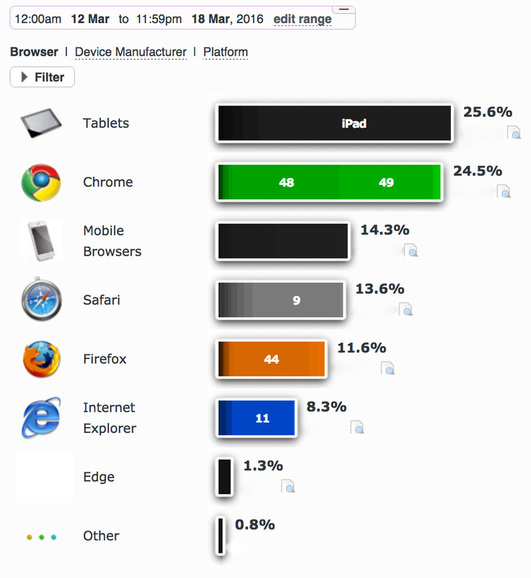
Browser friendly
|
Page Load SpeedHow long does it take for your page to appear?Speed on an image-based website is largely determined by file size (based on resolution, actual dimensions and file type). To keep your website fast you need to make sure you don’t make images any bigger than they need to be. This is Google’s advice about how to make the above the page content load faster You can also test how fast your website is.
|
Text for an artist’s site
Writing for the web |
Captions |
|
Tips for writing text on websites and blogs
Web contentHow your website ranks in response to google searches depends on the quality of the content as well as the number of people who follow an artist. REFERENCE
|
Keep your captions consistent – decide what to include in a caption eg
Buyers’ “need to know” informationYou must advise people of what they are buying in terms of presentation and “add ons”
|
Images for an artist’s site
Image oriented design |
Image size and definition |
|
You may have noticed that websites which have had a makeover recently are getting bigger and better images. Images are becoming very prominent on all sorts of sites. A contemporary website design for an artist’s website should provide a range of ways for displaying images.
|
If you want people to but your art, people need to see what they are buying. On the other hand the speed of your website is a major factor in it ranking well. TIPS:
|
A Design Check ListBelow are articles which provides information and tips on website design
|
LayoutThe importance of the page fold
|
Sell Art
|
See also my section on this website about Selling Art Things you need to think about when trying to sell art via your website include:
Most importantly, you need to think about whether you are likely to sell enough art to make a proper ecommerce facility for your website a cost-effective proposition – or whether you might do better to use an external third party store/site (eg Etsy, eBay) |
REFERENCE:
|
Websites to look at
Below are some suggestions of websites to look at. None of them are perfect but all have something to help us understand what is possible.
- Brand new website raises design standard for art societies – Has your art society updated its website to cope with mobile devices and changes in the way Google ranks websites?
- The Mall Galleries has a NEW website – a review of the new Mall Galleries website – highlighting new features and better presentation of information.
- The Royal Academy of Arts has a new website – A short review of the brand new website for the Royal Academy of Arts which has been devised in response to its new digital strategy for creating engagement with its target audiences
- Search Quality Guidelines: Find out how Google rates websites
An overview of the guidelines Google publishes on how it rates website content and value to those searching for information.
|
Contents:
|
People don’t read the web in the same way as they read a book.
|
RECOMMENDED: A number of the references on this page are to Jakob Nielsen’s Alertbox which is one of the best sources of good advice about designing websites and writing for the web that I know on the internet. Other references include professional and formal advice for people writing for major websites such as the BBC and the UK government website.
What I’ve tried to do it fillet and organise some of his best posts to provide a sampler of what is on offer – and they points people need to be aware of.
How people read the web
NEVER assume people are going to read everything you have to say.
People scan – they don’t read every word. They also scan a page in a particular way – this should influence where your content goes
The trick with writing for the web is all about working out how to get people to read more
- how to make it reader-friendly
- how to say it in fewer words
- how to guide them to what they want to read
Position on the Page
|
Straplines and Taglines
|
How to structure text
Titles and Headlines
|
- Techie: 9 Reasons Why the Title is Important | Making A Mark – The title or headline of an article, blog post or advert is the main reason why a lot of people read what else you have to say
- Microcontent: Headlines and Subject Lines | Alertbox – Online headlines must be absolutely clear when taken out of context. They should be written in plain language (no puns or clever headlines). 5 additional guidelines + examples of bad microcontent.
Narrative and paragraphs
- Break Grammar Rules on Websites for Clarity | Alertbox – The fact people scan text on web pages means web writing should be different from print writing. Some grammar rules are worth breaking if they improve fast comprehension
Font size and legibility
People sometimes forget that in order for people to able to read your text fast it had to be legible.
Things to think about:
- Is the font size big enough? Can you read text easily on a mobile device if you leave the zoom function untouched?
- Does the font make it easier or more difficult to read text? People like the design aspects of some fonts and completely forget about the functionality ie can people read the font quickly and easily.
- Is there good contrast between the font colour and the background colour? For people whose eyesight is less than perfect this can be a key factor in whether or not they try to read your sight. (Personally I refuse to try and read anything which is white text on a black background unless the font is large and lines are well space)
- Is the line spacing give the text room to breathe? Lines of text which are too close together make it much more difficult to read text
Colour for titles and links
Colour can be used constructively to help people scan a page. It’s a lot easier to scan the pages on this website because the headings and sub-headings are picked out using colour.
How to write the text
Vocabulary
|
Reference:
|
Is your website or blog mobile-friendly?
|
It’s ABSOLUTELY ESSENTIAL to get to grips with what’s involved in being mobile-friendly now that:
|
|
Two tools to test mobile-friendliness
|
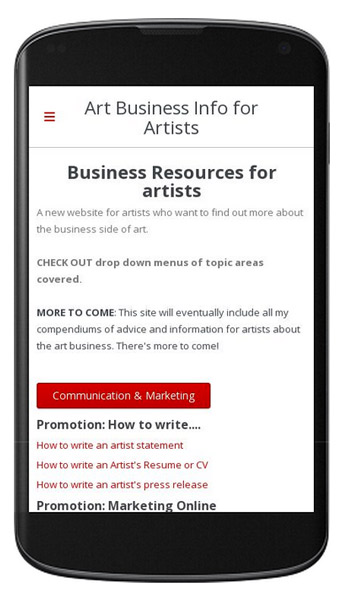
The Mobile Friendly Check List
Accessible
|
Technically efficient and effective
|
|
Is it easy to navigate using a mobile device?
Can you read the text easily?
Is scrolling easy?
|
Does the content resize to the size of the viewable screen?
Does it load quickly using mobile broadband? Is it compatible with all devices?
Do URLs and html stay the same? Does it pass the Google Mobile-Friendly Test?
|
Prioritising for mobile devices
|
Responsive templates
|
|
It’s essential that a website works well on a mobile device for the customer. That means:
Google recommends that you Optimize your entire site for mobile devices. Google now ranks websites accessed via mobile devices by whether or not the website has been optimised for a mobile experience. If you’ve not updated your website will not rank well for mobile devices. Mobile devices are now the technology of choice for many people browsing websites.
|
Responsive templates enable a web design to resize automatically for any screen size. Plus when using a responsive web design:
If your site is NOT mobile friendly it will be difficult if not impossible to read easily on a mobile device.
In my blog post Companies who can resize your website for different screen sizes I detail a list of companies that Google is highlighting as approved multi-screen vendors. |
More about being mobile-friendly
|
Getting Started – includes tips on:
|
Bing
|
How to sell art online – an introduction for artists
|
E-commerce is about buying and selling goods online and commercial transactions conducted electronically via the internet. Viewing and buying art online is one of the growth areas of the internet. Much of the advice you can find below is generic and applicable to all artists no matter where they live. Where information is country-specific, it tends to focus on on the UK. It also provides information relevant to the US market If you like this site please recommend to friends and/or add a link to it on your website |
Whether you are an emerging or experienced artist, this site helps you find out about:
|
TIPS for ecommerce online
|
Here are some brief pointers for selling art online
|
|
The Rules: Law and Regulations about Selling Art Online
|
Selling art online means you must know, understand and observe the law and regulations for e-commerce. Ignorance is no defence. Why the rules of engagement are upfront! There are two main reasons why artists fail to get off on the right foot when it comes to selling their art online
|
This site can’t possibly explain the ins and outs of all the relevant law and regulations of all the countries that readers may live in. In order to outline the basics, I’ve focused BELOW on:
However you do need to do your own homework as well. Remember ignorance is no defence in court or the eyes of the tax authorities! |
UK: E-COMMERCE LAW & REGULATIONS
Business Companion Guides – including Distance Selling
|
The Department for Business, Energy & Industrial Strategy aim to provide an accessible guide to those running a business of what they have to do to comply with the law. it developed the These include guides to
The default country is England but you have the option to change the country and review guidance for Wales and Scotland In brief, laws relating to retailing goods and services in and from the UK cover:
|
REFERENCE: Government Guidance in the UK
|
The regulations set out:
– the information which a trader must give to a consumer before and after making a sale
– how that information should be given
– the right for consumers to change their minds when buying at a distance or off-premises
– delivery times and passing of risk
– a prohibition on any additional payments which appear as a default option
– a prohibition on consumers having to pay more than the basic rate for post-contract customer helplines.
Distance Selling in the UK – official guidance
What is distance selling?
|
Distance selling takes place when a retailer – such as an artist – sells without face-to-face contact with the customer – such as online, mail order or by telephone
|
For artists this covers
|
Online, mail and telephone order customers have the right to cancel their order for a limited time even if the goods aren’t faulty. Sales of this kind are known as ‘distance selling’.
What does the law cover?
|
In the UK retailers and consumers used to be guided by advice from The Office of Fair Trading – but this closed on 1 April 2014. It’s been replaced by the Competition and Markets Authority. Its aim is to
The CMA works with a range of business groups including:
|
Two distinct types of legislation affect on-line retailers in the UK. These are:
In addition there are specific rules:
|
Consumer law changed on 1 October 2015, as the Consumer Rights Act came into force. The changes cover:
– what should happen when goods are faulty
– unfair terms in a contract
– what happens when a business is acting in a way which isn’t competitive
– written notice for routine inspections to be given by public enforcers, such as Trading Standards
– greater flexibility for public enforcers to respond to breaches of consumer law, such as seeking redress for consumers who have suffered harmAs well as these changes there are 2 new areas of law covering:
– what should happen when digital content (eg online films, games, e-books) is faulty – the act now gives consumers a clear right to repair or replacement
– how services should match up to what has been agreed, and what should happen when they do not or when they are not provided with reasonable care and skill (eg giving some money back if it is not practical to bring the service into line with what was agreed)
Consumer Rights Act 2015 | policy Paper
|
REFERENCE: GOVERNMENT GUIDANCE The law and regulations in the UK cover the following.
|
Guidance when you are not selling face to face / selling online
General guidance about the sale and supply of goods following The Consumer Rights Act 2015
General guidance on trading and contractual and business terms
|
|
Unfair contract terms
When doing business with customers, your contract terms need to be demonstrably fair. That’s because an ‘unfair’ contract term if not legally binding – and you cannot rely on it in any dispute should this get as far as court. REFERENCE: Unfair terms and your business (March 2016) |
These are specific government guides about what constitutes an unfair contract terms or condition. They also tell you what you should do.
|
|
The Distance Selling Regulations (‘DSRs’) give buyers:
Note that there are different rules for downloads and streaming services. |
|
|
The Electronic Commerce (EC Directive) Regulations 2002 (‘ECRs’) require all commercial websites to provide to customers – via the website –
|
Value Added Tax (VAT) applies to ALL retailers if you’re supplying digital services to consumers based in other EU countries (irrespective or turnover). You must either:
|
Invoices
|
Invoices: The government provides a very clear statement about Invoices – what they must include
|
|

|
The government website also provides a clear statement of what laws apply in relation to accepting returns and giving refunds: the law
|
|
If you consider or decide to run your trading arm as a limited company, you also need to be aware of all the paperwork requirements for a limited company
Returns and Refunds
These are links to relevant government websites and advice centres relating to consumer rights relating to returns and refunds.
- Accepting returns and giving refunds: the law – the statement on the Gov.uk website of what retailers have to do whether selling direct or online
- Returns policies | Business Companion Guide
USA: E-COMMERCE LAW & REGULATIONS
|
Artists MUST take note of all local state regulations relating to selling art and selling art online. A useful principle is to assume a law or regulation applies to you until such time as you find a government website which says it doesn’t! The links listed below are primarily to government sites (rather than articles by people writing about the legislation and regulation). However you should check out dates on all information. What has been true in the past may no longer be relevant. |
It’s impossible for me to cover all the variations at a local level. Listed below are links to the the main Federal websites which set out the laws and regulations you need to observe This site does not warrant that all links lead to the most current and up to date information. I do not live in the USA although I do try and review and update periodically. Frankly trying to keep up with changes at the moment under the current administration is also taxing and confusing. If you know of more relevant and up to date information, please contact me by leaving a comment and a URL for the site which is provides that information. |
Under the law, claims in advertisements must be truthful, cannot be deceptive or unfair, and must be evidence-based.
Federal Trade Commission
Federal Trade Commission – CAN-SPAM requirements
|
Federal Trade Commission: CAN-SPAM Act: A Compliance Guide for Business
This page explains federal requirements and penalties for those who send commercial emails, including consumers’ right to ask e-mailers to stop spamming them. |
The CAN-SPAM Act: Requirements for Commercial E-mailers
- The CAN-SPAM Act requires the Commission to issue regulations “defining the relevant criteria to facilitate the determination of the primary purpose of an electronic mail message.”
- The CAN-SPAM Act applies almost exclusively to ALL “commercial electronic mail messages”.
- Each separate email in violation of the CAN-SPAM Act is subject to penalties of up to $40,654, so non-compliance can be costly.
Do you use email in your business? The CAN-SPAM Act establishes requirements for commercial messages, gives recipients the right to have you stop emailing them, and spells out tough penalties for violations.
Federal Trade Commission
Despite its name, the CAN-SPAM Act doesn’t apply just to bulk email. It covers all commercial messages, which the law defines as “any electronic mail message the primary purpose of which is the commercial advertisement or promotion of a commercial product or service,” including email that promotes content on commercial websites. The law makes no exception for business-to-business email. That means all email – for example, a message to former customers announcing a new product line – must comply with the law.
Federal Trade Commission
CAN-SPAM’s main requirements:
- Don’t use false or misleading header information. Your “From,” “To,” “Reply-To,” and routing information – including the originating domain name and email address – must be accurate and identify the person or business who initiated the message.
- Don’t use deceptive subject lines.
- Identify the message as an ad.
- Tell recipients where you’re located. Your message must include your valid physical postal address.
- Tell recipients how to opt out of receiving future email from you. Craft the notice in a way that’s easy for an ordinary person to recognize, read, and understand.
- Honor opt-out requests promptly. Any opt-out mechanism you offer must be able to process opt-out requests for at least 30 days after you send your message.
- Monitor what others are doing on your behalf. you can’t contract away your legal responsibility to comply with the law.
Federal Trade Commission – Online Advertising
The FTC has enforced and will continue enforcing its consumer protection laws to ensure that products and services are described truthfully online, and that consumers understand what they are paying for. These activities benefit consumers as well as sellers, who expect and deserve the opportunity to compete in a marketplace free of deception and unfair practices.
.com Disclosures
|
Federal Trade Commission – .com Disclosures: How to Make Effective Disclosures in Digital Advertising
Digital advertising applies to print, on radio or TV, or on the InternetThis publication offers practical tips on how to make effective disclosures up front and online. View PDF (2.22 MB)It describes the information businesses should consider as they develop online ads to ensure that they comply with the law. |
|

USA.gov – Small Business
The Small Business website – within US..gov – is the U.S. Government’s official website for small businesses. It contains advice and information about ‘how to’
It helps business owners successfully start and operate while staying compliant with laws and regulations.
It also provides access to State and Territory Business Resources
Learn rules and regulations for running an online business
US Chamber of Commerce – Telecommunications & E-Commerce Committee
The Telecommunications & E-Commerce Committee is the place where you can find the issues which the business sector are lobbying on. Current issues are:
How to be safe and secure when selling online
Advice from the UK Government
|
Advice from other sources
|
Advice from PayPal
|
PayPal has a number of reference points relating to buying and selling online and being secure. If you propose to use PayPal as part of being retailing your art online then they are all a recommended read for the following reasons
|
Selling securely and how to prevent fraud and losses
PayPal provides advice about selling securely and how to prevent fraud and losses through its PayPal Seller Protection Programme – including, for example:
Dispute Resolution
|
E-commerce software
Questions to ask
Aspects which need to be assessed when considering eCommerce software are as follows:
- Integration: Can the software be integrated into or used with your existing website or blog?
- Accessible: Does it use responsive templates such that the online store can be seen easily on screens of different sizes
- Templates: How many templates are there? Are they the sort you wouldn;t mind using? (i.e. there’s no point in having lots of templates if you wouldn’t want to be associated with any of them and/or none would allow your artwork to look good!)
- Product display: Can it display your artwork well? How many changes can you make to how it is displayed?
- Payment systems: what payment systems does it allow you to use?
- Reports: are standard reports built into the system AND does it allow you to configure you own reports?
- Pricing plans – This software is not free. So – what’s the cost of using the software and do the options have one which is a good fit with your business? How do the fees work relative to the cost of your artwork?
eCommerce primer
- eCommerce 101 – TopTenREVIEWS – An outline of steps for getting started selling online
- eCommerce Selling on the Internet | Top Ten Reviews – Key things to be aware of
|
eCommerce software options Most offer 14 day free trials. If you’re going to take the plunge make sure you are a in position to properly test the software
|
Reviews of eCommerce software It’s always difficult to know whether reviews have been sponsored – there’s certainly quite a few reviews out there which are destined to favour one provider!
|